Understanding the Illustrator Grunge Vector Brush: A Practical Guide for Designers
In the realm of digital illustration and graphic design, texture often serves as the bridge between a flat, sterile vector image and a composition that feels tactile and authentic. The Illustrator Grunge Vector Brush has emerged as a critical tool for designers seeking to inject character, history, and organic imperfection into their work without sacrificing the scalability and editability inherent to vector formats. For professionals and hobbyists alike, understanding the nuances of this resource is essential for making informed decisions about project workflows, file management, and final output quality.
Defining the Illustrator Grunge Vector Brush
An Illustrator Grunge Vector Brush is not merely a single stroke; it is a collection of pre-defined path data designed to mimic the appearance of physical wear, tear, and artistic media within Adobe Illustrator. Unlike standard raster textures that are simply pasted over an image, these brushes are mathematically defined strokes that retain their vector properties. This distinction allows them to be scaled infinitely, recolored dynamically, and manipulated with path-finding tools while maintaining crisp edges at any resolution.
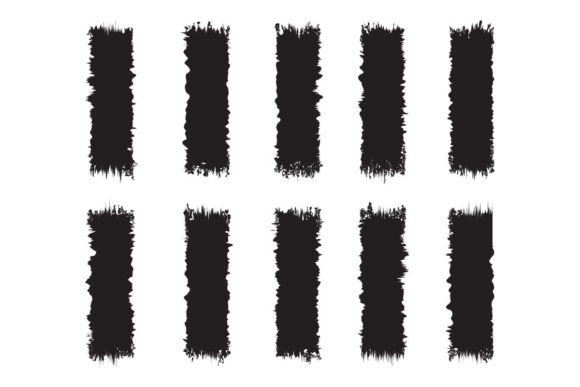
The specific set in question typically includes a variety of styles, such as the black paint stroke brush, which simulates heavy ink or acrylic application, and the paper scrap grunge brush, which replicates torn edges and fibrous paper textures. Additionally, the inclusion of dirty vector Brushes provides a way to introduce noise and irregularity that breaks up the perfect geometry often associated with digital art. These elements function together to create a cohesive aesthetic that suggests age, grit, and manual creation.
The Value of Multi-Format Availability
A significant factor in evaluating a grunge brush set is the versatility of its file formats. High-quality resources provide a comprehensive package, including EPS files for native Illustrator compatibility, SVG files for web and scalable graphics, PNG files for immediate use in raster-based software, and High-Resolution JPG previews. This multi-format approach ensures that the assets can be integrated into diverse workflows. Whether you are designing a complex vector logo, preparing a print-ready layout for a hoodie, or creating a digital mockup for a mug, having access to the appropriate file type streamlines the production process.
Comparing Grunge Brushes to Alternative Texturing Methods
When considering how to add texture to a design, the Illustrator Grunge Vector Brush competes with several other approaches, each with distinct tradeoffs. Understanding these differences helps determine the best fit for specific project requirements.
Vector Brushes vs. Raster Overlays
The most common alternative to using vector brushes is applying raster textures (such as .jpg or .png overlays) on top of vector artwork. While raster overlays can offer photorealistic detail, they suffer from resolution limitations. If a design created with a raster overlay is resized significantly—say, from a business card to a billboard—the texture will pixelate and lose clarity. In contrast, the grunge vector brush remains sharp at any size because it is constructed from mathematical paths rather than pixels. Furthermore, raster overlays often require blending modes and masking to integrate seamlessly, whereas vector brushes are part of the stroke itself, allowing for easier color changes and shape manipulation.
Built-In Tools vs. Custom Brush Sets
Adobe Illustrator comes with a default library of calligraphic and scatter brushes that can simulate some roughness. However, these built-in options often lack the specific "dirt" and chaotic energy required for true grunge aesthetics. Custom sets, such as those featuring dirty vector Brushes and paintbrush stroke variations, offer a much higher degree of specificity. They are curated to look like actual physical media, providing a level of realism that generic system brushes cannot match. The tradeoff is that custom brushes require installation and familiarity with the Brushes panel, but the payoff in visual quality is substantial.
Evaluating Strengths and Limitations
To make a balanced decision, one must weigh the advantages of using an Illustrator Grunge Vector Brush against its potential constraints.
Key Advantages
- Editability: Because the brushes are vector-based, every aspect of the stroke can be modified. You can change the weight, adjust the spacing, or alter the color of a black paint stroke brush instantly without needing to recreate the element.
- Scalability: Ideal for large-format printing, these brushes ensure that the grunge texture looks as crisp on a t-shirt print as it does on a digital icon.
- Workflow Efficiency: Applying a complex texture becomes a matter of selecting a brush and drawing a line, saving hours compared to manually painting or importing multiple texture layers.
- File Size Management: Compared to high-resolution raster images, vector brushes generally result in smaller file sizes, which is beneficial for sharing projects or embedding in web documents via SVG.
Potential Tradeoffs
- Complexity of Paths: Highly detailed grunge brushes can sometimes generate complex paths with thousands of anchor points. If overused, this can slow down rendering times in Illustrator or cause issues when exporting to certain formats.
- Learning Curve: Achieving the desired effect often requires adjusting settings like opacity, blending modes, and brush scaling, which may take time to master for beginners.
- Style Consistency: Not all grunge brushes work well together. Mixing a paper scrap grunge brush with a smooth geometric font might create visual dissonance if not carefully curated.
Best-Fit Situations and Use Cases
The Brush vector Illustrator resources described here are particularly effective in scenarios where authenticity and tactile appeal are paramount. They are widely recognized as a design element for t-shirt designs, where the ability to print intricate details on fabric is crucial. The vector nature ensures that the print shop can scale the artwork to fit various garment sizes without losing the gritty texture of the dirty vector Brushes.
Beyond apparel, these brushes are excellent for merchandise such as mugs, hoodies, and posters. The ability to easily edit and color change the elements means a single asset can be adapted for different product lines or seasonal campaigns. For instance, a set of illustrator grunge vector brush illustrations can be applied to a white mug design, then recolored to match a black hoodie, all within the same document.
When to Choose Another Option
While versatile, the Illustrator Grunge Vector Brush is not the solution for every design challenge. If your project requires photorealistic imagery, such as a background for a magazine cover featuring real-world photography, a raster-based workflow with photo editing software might be more appropriate. Similarly, if the design needs to be extremely lightweight for mobile web applications where loading speed is the primary concern, simple CSS effects or minimal vector shapes might outperform complex grunge vectors. In cases where absolute uniformity and cleanliness are required, such as in technical diagrams or corporate identity guidelines, the intentional chaos of a grunge brush would likely be counterproductive.
Practical Implementation Strategies
For those deciding to incorporate these tools, practical implementation involves more than just dragging and dropping. To get the most out of the grunge vector brush, consider the following strategies:
- Test at Scale: Always preview your design at 100% zoom to ensure the brush details are visible but not overwhelming. What looks good on screen may appear muddy when printed small.
- Layer Management: Use the transparency and blending modes effectively. Placing a black paint stroke brush on a "Multiply" layer can create depth without obscuring underlying elements.
- Customization: Do not rely solely on the default settings. Expand the appearance of the brush strokes occasionally to tweak individual anchor points for a unique look.
- Format Selection: When delivering files to clients or printers, ensure you export the correct format. Use EPS for professional print services and SVG for web integration to maintain the vector integrity.
Making the Final Decision
Choosing whether to invest time in mastering an Illustrator Grunge Vector Brush depends largely on the goals of your design projects. If you prioritize flexibility, scalability, and the ability to create unique, textured visuals that stand out in a sea of clean digital graphics, this resource offers significant value. The availability of multiple file formats—EPS, SVG, PNG, and JPG—further enhances its utility across different platforms and industries.
However, if your work demands photorealism or extreme simplicity, other tools may serve you better. Ultimately, the set of illustrator grunge vector brush elements should be viewed as a powerful addition to a designer's toolkit, one that bridges the gap between digital precision and analog charm. By understanding its strengths, limitations, and ideal applications, you can confidently decide when to deploy these brushes to elevate your creative output.