Aurora Borealis Overlays Brushes
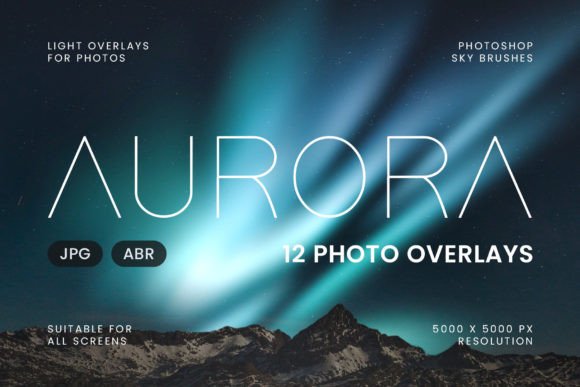
There is a distinct magic in the night sky, but capturing it often feels like chasing a ghost. The Northern Lights are elusive, requiring specific weather, remote locations, and expensive camera gear to photograph authentically. For many creators, designers, and photographers, the opportunity to witness this phenomenon firsthand is rare or non-existent. This limitation does not have to stop your creative vision. With high-quality digital assets, you can bring the ethereal glow of the aurora into your work instantly. The Aurora Borealis Overlays Brushes pack offers a practical solution for adding these stunning lights to your projects without leaving your desk.
This resource provides 12 high-resolution images at 5000 x 5000 pixels, designed specifically for seamless integration into Photoshop workflows. Whether you need to composite a dramatic sky over a cityscape or add subtle atmospheric depth to a portrait, these tools bridge the gap between reality and imagination. By understanding how to leverage these overlays and brushes effectively, you can elevate your visual storytelling while maintaining professional quality.
The Power of High-Resolution Compositing
The foundation of any successful photo manipulation lies in the quality of the source material. Low-resolution textures often result in pixelation when scaled up, ruining the illusion of realism. The Aurora Borealis Overlays Brushes set addresses this by providing files at 5000 x 5000 pixels. This resolution ensures that even when printed on large formats or viewed on high-density displays, the light patterns remain crisp and detailed.
What makes these overlays particularly useful is their flexibility. Unlike static filters that apply a uniform effect across an entire image, these individual layers allow for precise control. You can rotate, scale, warp, and blend specific sections of the aurora to match the perspective of your base image. This level of customization is essential for creating compositions that feel organic rather than pasted on. When the light curves naturally around a mountain ridge or fades softly behind a tree line, the viewer accepts the scene as plausible.
Mastering the Screen Blend Mode
The technical application of these assets is straightforward yet powerful. The core technique involves placing the overlay image on top of your background layer and changing the blending mode to Screen. In Photoshop, the Screen mode multiplies the inverse color values of the layers, effectively discarding black pixels and allowing only the lighter tones to show through. Since the Aurora overlays are typically shot against dark backgrounds, the black areas become transparent, revealing your original photo underneath while the glowing greens, purples, and pinks illuminate the scene.
To achieve the most natural look, do not rely solely on the default opacity. Adjusting the opacity slider allows you to control the intensity of the light. A setting of 100% might look too artificial for a subtle mood piece, whereas dropping it to 40% or 50% can create a faint, atmospheric glow that enhances the existing shadows. Additionally, experimenting with the layer mask is crucial. Use a soft brush to erase parts of the overlay where the light would logically be blocked by foreground objects, such as buildings, trees, or people. This attention to detail separates amateur edits from professional-grade composites.
Creative Applications Across Industries
The versatility of the Aurora Borealis Overlays Brushes extends far beyond landscape photography. Various industries can adapt these assets to meet specific branding and communication goals. Understanding these use cases helps maximize the value of the toolset.
- Travel and Tourism Marketing: Destination marketers often struggle to capture the "perfect" shot of a location during peak aurora season. Using these overlays, they can enhance promotional materials for northern regions, creating aspirational imagery that encourages bookings without waiting months for the right conditions.
- Fantasy and Sci-Fi Book Covers: Authors and cover designers frequently need otherworldly backdrops. The dynamic colors of the aurora provide an immediate sense of mystery and wonder, perfect for fantasy novels or science fiction covers where the setting plays a pivotal role in the narrative.
- Event Photography Enhancement: Wedding and event photographers sometimes face disappointing lighting conditions. While ethical considerations should always guide retouching, adding a subtle aurora glow to a twilight reception photo can transform a flat image into a memorable keepsake, provided the edit remains tasteful and consistent with the venue's atmosphere.
- Digital Art and Concept Design: Concept artists can use the brush version of the pack to paint custom aurora effects directly onto their canvases. This allows for complete freedom in shaping the light, enabling the creation of alien skies or magical realms that defy real-world physics.
Adapting Styles for Different Audiences
Different audiences respond to different visual styles. A corporate presentation requires a different aesthetic than a personal blog post or a social media campaign. The Aurora Borealis Overlays Brushes pack supports this variety through its diverse collection of 12 unique patterns.
For a professional audience, subtlety is key. Select an overlay with softer gradients and lower contrast. Apply it with reduced opacity and perhaps a slight color adjustment to ensure it complements the brand colors rather than overpowering them. The goal here is to add a touch of sophistication and depth without distracting from the main message.
Conversely, for social media content targeting younger demographics or creative communities, boldness works better. Choose overlays with vibrant greens and deep violets. Increase the saturation slightly and use higher opacity to make the image pop on small screens. In these contexts, the aurora serves as a hook to grab attention quickly in a crowded feed. The ability to switch between these approaches with the same asset library saves time and maintains consistency across different platforms.
Using the Brush Tool for Precision
While the overlay images are excellent for broad sky replacements, the included Photoshop brushes offer a different workflow. These brushes allow you to paint the aurora directly onto your image, stroke by stroke. This method is ideal for filling gaps in a composition or adding light to specific areas where a full overlay might look unnatural.
When using the brushes, vary your brush size and flow settings to mimic the fluid movement of the actual lights. Start with larger strokes to establish the general shape and direction of the aurora, then use smaller, more delicate strokes to add intricate details near the horizon or around focal points. This manual approach gives you total control over the placement and intensity, ensuring the light interacts correctly with your subject. It is particularly useful for correcting lighting inconsistencies or adding a rim light effect to subjects silhouetted against the night sky.
Maintaining Consistency and Quality
As you integrate these assets into your workflow, keeping results clear and organized is vital for long-term efficiency. Create a dedicated folder structure for your project files, separating the raw overlays from your edited versions. Name your layers descriptively within Photoshop so that if you need to revisit a project weeks later, you can easily identify which aurora pattern was used and how it was blended.
Consistency also applies to color grading. The aurora should harmonize with the color temperature of your base image. If your photo has a warm, orange streetlight glow, a cool blue-toned aurora might clash unless carefully balanced. Use adjustment layers like Color Balance or Hue/Saturation clipped to the overlay layer to fine-tune the colors. This ensures the added lights feel like they belong in the environment, reflecting the ambient light sources present in the scene.
Finally, remember that the best edits are those that go unnoticed. The goal of using Aurora Borealis Overlays Brushes is not to prove that you added a filter, but to tell a story that resonates with the viewer. Whether you are enhancing a travel blog, designing a product launch graphic, or creating art for personal expression, these tools provide the means to turn ordinary night shots into extraordinary visuals. By combining technical precision with creative intuition, you can unlock new possibilities in your design portfolio and deliver work that truly inspires.